|
PC GAMES
News
Reviews
Previews
Movies/Media
Downloads
Hints/Codes
GameGuides.com
Special Features
Beta Center
Release Calendar
Forums
Top Games
PC GENRES
Action
Adventure
Driving
Puzzle
Role-Playing
Simulation
Sports
Strategy
SWITCH TO:
VIDEO GAMES
GAMESPOT LIVE
GAMEBUYER
HARDWARE
SUBSCRIBE TO:
PC Newsletter
HW Newsletter
ELITE SERVICES
Join GameSpot
SEE ALSO
GameFAQs
Gamespy Arcade
Netflix
INFORMATION
Help
Contact Us
International
| |

Virgo - Le Serpent Rouge Stanza #8
Once you're finished speaking with the various characters, return to your hotel room and fire up SIDNEY once again. Use the SEARCH function from the top menu to look up some of the words used in Le Serpent Rouge for additional clues about the stanza. For instance, perform searches on St. Vincent, Temple of Solomon, and floor plan. Be sure to follow all the additional links. You must search on the floor plan, so SIDNEY will send an e-mail off requesting a copy of the floor plan.
After performing the searches, select the ANALYZE function from the top menu. Open up the map file if it already isn't loaded. Select the Enter Points function from the top menu. You'll enter four points on the map to mark the temple walls. Your goal is to make a two square wide rectangle down the center of the grid you placed earlier. To do so, move your mouse to the top of the grid and place points at the top of the fourth and sixth lines from the left. Next, move your mouse to the bottom of the grid and place points at the top of the fourth and sixth lines from the left. If done correctly, the temple walls will form after you press the Start Analysis button.
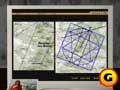
Here's what the map file looks like after solving the Libra riddle. |
Libra - Le Serpent Rouge Stanza #9
Again, before you dive into the analysis functions, use the SEARCH button at the top menu to perform searches on the clues provided in the stanza - soul, hexagram, and seal. Follow all additional links provided. When you're finished, head back to the ANALYZE function and open up the map file. Select the Use Shape function from the top menu and choose the hexagram. Place the hexagram just inside the circle; resize it so its outer points rest just on the border of the circle. Next, rotate the hexagram until the shape locks into place. One arm will get placed at the intersection of the meridian, the sunrise line, and at the Poussin Tomb / L'Ermitage line. With the hexagram locked into place, exit from SIDNEY, and the time block will conclude.
GameSpot is a CNET Networks Media Property. Copyright ©1995-2001 CNET Networks, Inc. All rights reserved. Privacy policy.
|
|
| |
|











