|
PC GAMES
News
Reviews
Previews
Movies/Media
Downloads
Hints/Codes
GameGuides.com
Special Features
Beta Center
Release Calendar
Forums
Top Games
PC GENRES
Action
Adventure
Driving
Puzzle
Role-Playing
Simulation
Sports
Strategy
SWITCH TO:
VIDEO GAMES
GAMESPOT LIVE
GAMEBUYER
HARDWARE
SUBSCRIBE TO:
PC Newsletter
HW Newsletter
ELITE SERVICES
Join GameSpot
SEE ALSO
GameFAQs
Gamespy Arcade
Netflix
INFORMATION
Help
Contact Us
International
| |

On the platform are a scale and a collection of gold plated objects. Click your mouse on the scale and radio Grace for assistance. She explains, with a clue, which objects should be placed on the scale. Pick up the infinity symbol first and place it on the scale (just use the scale icon after you've clicked the infinity symbol). Next, pick up the egg and place it on the scale. Finally, pick up the piece of fruit and place it on the scale. After all three are on the scale, a door will open ahead of you.
Temple Hexagram Chamber
When you enter the next chamber, you'll see a set of display stands and several dark areas. Walk Gabriel around the chamber and examine everything before picking anything up. Also, use the radio to ask Grace about the objects, the Solomon statue, and the Latin phrases before attempting to pick up any of the objects.
Move over to the display stand with the gold and leather glove. Pick up the leather glove; Gabriel will automatically put the glove on his hand. Walk over to the display stand with the fire and water. Use the camera to look inside the bowl of fire and spot the stone. With leather glove in hand, use the verb menu to pick up the stone.
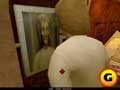
Select the mirror where Gabriel appears old. |
Walk over to the two statues. The one on the left looks like a demon, and the one on the right looks like a knight. Place the stone in the outstretched hand of the demon statue. When you do, the dark areas of the chamber illuminate revealing additional display stands (and the display stands you just used turn dark).
GameSpot is a CNET Networks Media Property. Copyright ©1995-2001 CNET Networks, Inc. All rights reserved. Privacy policy.
|
|
| |
|











