|
PC GAMES
News
Reviews
Previews
Movies/Media
Downloads
Hints/Codes
GameGuides.com
Special Features
Beta Center
Release Calendar
Forums
Top Games
PC GENRES
Action
Adventure
Driving
Puzzle
Role-Playing
Simulation
Sports
Strategy
SWITCH TO:
VIDEO GAMES
GAMESPOT LIVE
GAMEBUYER
HARDWARE
SUBSCRIBE TO:
PC Newsletter
HW Newsletter
ELITE SERVICES
Join GameSpot
SEE ALSO
GameFAQs
Gamespy Arcade
Netflix
INFORMATION
Help
Contact Us
International
| |

Day 1, 2:00 pm - Playing as Gabriel Knight
You'll begin the new time block outside the hotel at the courtyard. Gabriel's priority is gaining use of a moped so he can visit the many locations around the hotel and village.
Moped Rental Shop
Move forward and slightly to the left from the hotel's immediate exterior. Just to the right of the fountain, you'll spot the entrance to the moped rental shop. Head inside. Walk to the front counter and speak with the man about renting a motorcycle or moped.
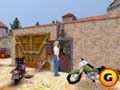
Head over to the moped rental shop for clues on how to obtain the motorcycle. |
Unfortunately, he'll indicate that all rentals are by reservation only, and each hotel resident has already put down his name for one of the bikes. Apparently, Gabriel must disguise himself to fool the moped clerk.
Making a Mosely Disguise to Rent the Moped
You must combine several items to construct an adequate disguise and gain access to the motorbike. First, return to the museum and swipe the red cap from the lost-and-found box. You couldn't do this in the previous time blocks, but Gabriel knows he needs it now and has little trouble stealing the hat from the box. With the red hat in hand, head to the church.
GameSpot is a CNET Networks Media Property. Copyright ©1995-2001 CNET Networks, Inc. All rights reserved. Privacy policy.
|
|
| |
|











