| 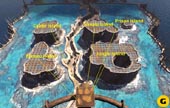 | | The buttons on the panel represent one of the five islands below. |
The Map Table Puzzle
Follow the path along the rift through the center of the island. When you reach the elevator in the fissure in the wall, take it up to the next level by pressing the button on the left side. Exit the elevator and go straight to the end of the platform. Look out to the island plateaus - they represent the five islands of Riven. Starting from the upper right and moving to the left, they are Crater Island, Temple Island, Prison Island, Plateau Island, and Jungle Island. The islands are also represented on the panel in front and below you in geometric form. You can press any of the buttons, but go ahead and start with Crater Island, the square button at the upper left of the panel.
After you press the button, a walkway extends to the round structure on the other side of the island behind you (go back to the elevator and straight through it to the other side). Enter the round structure and walk up to the Map Table Puzzle. Here you'll see a table divided into a five-by-five grid. In front of it is a panel that mirrors the panel on the other side.
| 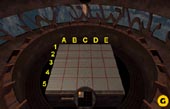 | | You can use these coordinates, which you must maintain visually. |
If you press the Crater Island button, you will see the same square shape on this panel, but divided into four small squares, with one lit yellow. Press the yellow button, and a three-dimensional topographical model of that section of Crater Island will rise up from the table in front of you. What you're trying to locate is the Fire Marble Dome on Crater Island. Once you find it, you must keep track of its grid location for use later at the Marble Puzzle. On Crater Island, it is inside that small hole in the mountainside. On other islands, you might actually see the small dome itself.
Since there are no coordinates on the grid, you must visually create your own.
| 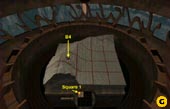 | | The dome on Crater Island is inside that small home. Mark its coordinates. Do the same for all the islands. |
The handle to the left of the button panel in front of the Map Table rotates both the Map Table and the button panel. You can use this to get a better look at different sides of the topographical image. If you must rotate the image, make sure you maintain a sense of your visual coordinates. They should always be A through E across the top and one through five across the left side, based on the position of the grid when you first approach the Map Table (before you ever use the rotate handle). On the panel, count off the squares for each island from top left to right. Therefore, for Crater Island, the Fire Marble Dome is in square one (on the panel) and coordinates B4 on the Map Table.
You must do the same thing for each of the five islands. Once you've figured the location of the Fire Marble Dome for one island, go back outside to the platform with the other button panel and choose another island. (Prison Island is the island represented by one square.)
Here is the solution based on this method:
|
Island |
Panel Square |
Table Square |
|
Crater Island |
1 |
B4 |
|
Plateau Island |
4 |
A2 |
|
Temple Island |
2 |
A1 |
|
Jungle Island |
5 |
D2 |
|
Prison Island |
1 |
B1 |
|