|
|
Top Contents Index Glossary |

|
Link Summary
|
|
In this section, you'll use an XSLT transformer to converting an arbitrary data structure to XML.
In general outline, then, you're going to:
For starters, you need a data set you want to convert and some program which is capable of reading the data. In the next two sections, you'll create a simple data file and a program that reads it.
We'll start by creating a data set for an address book. You can duplicate the process, if you like, or simply make use of the data stored in PersonalAddressBook.ldif.
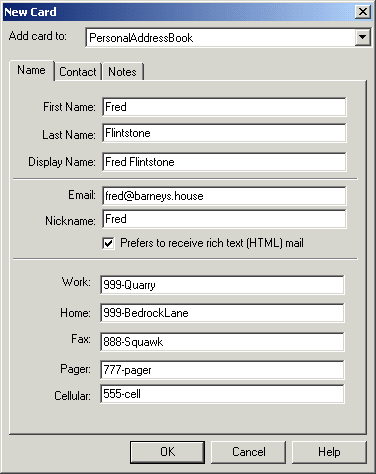
The file shown below were produced by creating a new address book in Netscape messenger, giving it some dummy data (one address card) and then exporting it in LDIF format. Here is the address book entry that was created:
Exporting the address book produces a file like the one shown below. The parts of the file that we care about are shown in bold.
dn: cn=Fred Flinstone,mail=fred@barneys.house
modifytimestamp: 20010409210816Z
cn: Fred Flinstone
xmozillanickname: Fred
mail: Fred@barneys.house
xmozillausehtmlmail: TRUE
givenname: Fred
sn: Flinstone
telephonenumber: 999-Quarry
homephone: 999-BedrockLane
facsimiletelephonenumber: 888-Squawk
pagerphone: 777-pager
cellphone: 555-cell
xmozillaanyphone: 999-Quarry
objectclass: top
objectclass: person
Note that: each line of the file contains a variable name, a colon, and a space followed by a value for the variable. The "sn" variable contains the person's surname (last name) and, for some reason, the variable "cn" contains the DisplayName field from the address book entry.
Note:
LDIF stands for LDAP Data Interchange Format, according to the Netscape pages. And LDAP, turn, stands for Lightweight Directory Access Protocol. I prefer to think of LDIF as the "Line Delimited Interchange Format", since that is pretty much what it is.
The next step is to create a program that parses the data. Again, you can follow the process to write your own if you like, or simply make a copy of the program so you can use it to do the XSLT-related exercises that follow.
Note:
The code discussed in this section is in AddressBookReader01.java. The output is in AddressBookReaderLog01.
The text for the program is shown below. It's an absurdly simple program that doesn't even loop for multiple entries because, after all, it's just a demo!
import java.io.*;


public class AddressBookReader01
{

    public static void main(String argv[])
    {
        // Check the arguments
        if (argv.length != 1) {
            System.err.println ("Usage: java AddressBookReader filename");
            System.exit (1);
        }
        String filename = argv[0];
        File f = new File(filename);
        AddressBookReader01 reader = new AddressBookReader01();
        reader.parse(f);
    }

    /** Parse the input */
    public void parse(File f)
    {
        try {
            // Get an efficient reader for the file
            FileReader r = new FileReader(f);
            BufferedReader br = new BufferedReader(r);

            // Read the file and display it's contents.
            String line = br.readLine();
            while (null != (line = br.readLine())) {
              if (line.startsWith("xmozillanickname: ")) break;
            }

            output("nickname", "xmozillanickname", line);
            line = br.readLine();
            output("email",    "mail",             line);
            line = br.readLine();
            output("html",     "xmozillausehtmlmail", line);
            line = br.readLine();
            output("firstname","givenname",        line);
            line = br.readLine();
            output("lastname", "sn",               line);
            line = br.readLine();
            output("work",     "telephonenumber",  line);
            line = br.readLine();
            output("home",     "homephone",        line);
            line = br.readLine();
            output("fax",      "facsimiletelephonenumber", line);
            line = br.readLine();
            output("pager",    "pagerphone",       line);
            line = br.readLine();
            output("cell",     "cellphone",        line);

        }
        catch (Exception e) {
            e.printStackTrace();
        }
    }

    void output(String name, String prefix, String line)
    {
        int startIndex = prefix.length() + 2;  // 2=length of ": "
        String text = line.substring(startIndex);
        System.out.println(name + ": " + text);
    }
}
This program contains 3 methods:
Running this program on the address book file produces this output:
nickname: Fred
email: Fred@barneys.house
html: TRUE
firstname: Fred
lastname: Flintstone
work: 999-Quarry
home: 999-BedrockLane
fax: 888-Squawk
pager: 777-pager
cell: 555-cell
I think we can all agree that's a bit more readable!
The next step is to modify the parser to generate SAX events, so you can use it as the basis for a SAXSource object in an XSLT transform.
Note:
The code discussed in this section is in AddressBookReader02.java.
Start by extending importing the additional classes you're going to need:
import java.io.*;import org.xml.sax.*; Import org.xml.sax.helpers.AttributesImpl;
Next, modify the application so that it extends XmlReader. That converts the app into a parser that generates the appropriate SAX events.
Public class AddressBookReader02implements XMLReader {
Now, remove the main method. You won't be needing that any more.
Add some global variables that will come in handy in a few minutes:Public static void main(String argv[]){// Check the argumentsif (argv.length != 1) {System.err.println ("Usage: Java AddressBookReader filename");System.exit (1);}String filename = argv[0];File f = new File(filename);AddressBookReader02 reader = new AddressBookReader02();reader.parse(f);}
    ContentHandler handler;

    // We're not doing namespaces, and we have no
    // attributes on our elements.
    String nsu = "";  // NamespaceURI
    Attributes atts = new AttributesImpl();
    String rootElement = "addressbook";

    String indent = "\n    "; // for readability!
The SAX ContentHandler is the thing that is going to get the SAX events the parser generates. To make the app into an XmlReader, you'll be defining a setContentHandler method. The handler variable will hold the result of that configuration step.
And, when the parser generates SAX element events, it will need to supply namespace and attribute information. Since this is a simple application, you're defining null values for both of those.
You're also defining a root element for the data structure (addressbook), and setting up an indent string to improve the readability of the output.
Next, modify the parse method so that it takes an InputSource as an argument, rather than a File, and account for the exceptions it can generate:
Now make the changes shown below to get the reader encapsulated by the InputSource object:public void parse(File f)InputSource input) throws IOException, SAXException
try { // Get an efficient reader for the fileFileReader r = new FileReader(f);java.io.Reader r = input.getCharacterStream(); BufferedReader Br = new BufferedReader(r);Note:
In the next section, you'll create the input source object and what you put in it will, in fact, be a buffered reader. But the AddressBookReader could be used by someone else, somewhere down the line. This step makes sure that the processing will be efficient, regardless of the reader you are given.
The next step is to modify the parse method to generate SAX events for the start of the document and the root element. Add the code highlighted below to do that:
/** Parse the input */ public void parse(InputSource input) ... { try { ... // Read the file and display it's contents. String line = br.readLine(); while (null != (line = br.readLine())) { if (line.startsWith("xmozillanickname: ")) break; }if (handler==null) { throw new SAXException("No content handler"); } handler.startDocument(); handler.startElement(nsu, rootElement, rootElement, atts); output("nickname", "xmozillanickname", line); ... output("cell", "cellphone", line);handler.ignorableWhitespace("\n".toCharArray(), 0, // start index 1 // length ); handler.endElement(nsu, rootElement, rootElement); handler.endDocument(); } catch (Exception e) { ...
Here, you first checked to make sure that the parser was properly configured with a ContentHandler. (For this app, we don't care about anything else.) You then generated the events for the start of the document and the root element, and finished by sending the end-event for the root element and the end-event for the document.
A couple of items are noteworthy, at this point:
Now that SAX events are being generated for the document and the root element, the next step is to modify the output method to generate the appropriate element events for each data item. Make the changes shown below to do that:
void output(String name, String prefix, String line)throws SAXException { int startIndex = prefix.length() + 2; // 2=length of ": " String text = line.substring(startIndex);System.out.println(name + ": " + text);int textLength = line.length() - startIndex; handler.ignorableWhitespace(indent.toCharArray(), 0, // start index indent.length() ); handler.startElement(nsu, name, name /*"qName"*/, atts); handler.characters(line.toCharArray(), startIndex, textLength); handler.endElement(nsu, name, name); }
Since the ContentHandler methods can send SAXExceptions back to the parser, the parser has to be prepared to deal with them. In this case, we don't expect any, so we'll simply allow the app to fall on its sword and die if any occur.
You then calculate the length of the data, and once again generate some ignorable whitespace for readability. In this case, there is only one level of data, so we can use a fixed indent string. (If the data were more structured, we would have to calculate how much space to indent, depending on the nesting of the data.)
Next, add the method that configures the parser with the ContentHandler that is to receive the events it generates:Note:
The indent string makes no difference to the data, but will make the output a lot easier to read. Once everything is working, try generating the result without that string! All of the elements will wind up concatenated end to end, like this: <addressbook><nickname>Fred</nickname><email>...
/** Allow an application to register a content event handler. */
Public void setContentHandler(ContentHandler handler) {
  this.handler = handler;
}

/** Return the current content handler. */
Public ContentHandler getContentHandler() {
  return this.handler;
}
There are several more methods that must be implemented in order to satisfy the XmlReader interface. For the purpose of this exercise, we'll generate null methods for all of them. For a production application, though, you may want to consider implementing the error handler methods to produce a more robust app. For now, though, add the code highlighted below to generate null methods for them:
Finally, add the code highlighted below to generate null methods for the remainder of the XmlReader interface. (Most of them are of value to a real SAX parser, but have little bearing on a data-conversion application like this one.)/** Allow an application to register an error event handler. */ Public void setErrorHandler(ErrorHandler handler) { } /** Return the current error handler. */ Public ErrorHandler getErrorHandler() { return null; }
/** Parse an XML document from a system identifier (URI). */
public void parse(String systemId)
throws IOException, SAXException
{ }

/** Return the current DTD handler. */
Public DTDHandler getDTDHandler()
{ return null; }

/** Return the current entity resolver. */
Public EntityResolver getEntityResolver()
{ return null; }

/** Allow an application to register an entity resolver. */
Public void setEntityResolver(EntityResolver resolver)
{ }

/** Allow an application to register a DTD event handler. */
Public void setDTDHandler(DTDHandler handler)
{ }

/** Look up the value of a property. */
Public Object getProperty(java.lang.String name)
{ return null; }

/** Set the value of a property. */
Public void setProperty(java.lang.String name, java.lang.Object value)
{ }

/** Set the state of a feature. */
Public void setFeature(java.lang.String name, boolean value)
{ }

/** Look up the value of a feature. */
Public boolean getFeature(java.lang.String name)
{ return false; }
Congratulations! You now have a parser you can use to generate SAX events. In the next section, you'll use it to construct a SAX source object that will let you transform the data into XML.
Given a SAX parser to use as an event source, you can (quite easily!) construct a transformer to produce a result. In this section, you'll modify the TransformerApp you've been working with to produce a stream output result, although you could just as easily produce a DOM result.
Note:
The code discussed in this section is in TransformationApp04.java. The results of running it are in TransformationLog04.Important!
Be sure to shift gears! Put the AddressBookReader aside and open up the TransformationApp. The work you do in this section affects the TransformationApp!
Start by making the changes shown below to import the classes you'll need to construct a SAXSource object. (You won't be needing the DOM classes at this point, so they are discarded here, although leaving them in doesn't do any harm.)
import org.xml.sax.SAXException; import org.xml.sax.SAXParseException;import org.xml.sax.ContentHandler; import org.xml.sax.InputSource; import org.w3c.dom.Document;... import org.w3c.dom.DOMException;import javax.xml.transform.dom.DOMSource;import javax.xml.transform.sax.SAXSource; import javax.xml.transform.stream.StreamResult;
Next, remove a few other holdovers from our DOM-processing days, and add the code to create an instance of the AddressBookReader:
public class TransformationApp
{
// Global value so it can be ref'd by the tree-adapterstatic Document document; DocumentBuilderFactory factory =DocumentBuilderFactory.newInstance();//factory.setNamespaceAware(true);//factory.setValidating(true); // Create the sax "parser".
AddressBookReader saxReader = new AddressBookReader();
try {
File f = new File(argv[0]);
DocumentBuilder builder = factory.newDocumentBuilder();document = builder.parse(f);
Guess what! You're almost done. Just a couple of steps to go. Add the code highlighted
below to construct a SAXSource object:
// Use a Transformer for output ... Transformer transformer = tFactory.newTransformer();// Use the parser as a SAX source for input FileReader fr = new FileReader(f); BufferedReader br = new BufferedReader(Fr); InputSource inputSource = new InputSource(Fr); SAXSource source = new SAXSource(saxReader, inputSource); StreamResult result = new StreamResult(System.out); transformer.transform(source, result);
Here, you constructed a buffered reader (as mentioned earlier) and encapsulated it in an input source object. You then created a SAXSource object, passing it the reader and the InputSource object, and passed that to the transformer.
When the app runs, the transformer will configure itself as the ContentHandler for the SAX parser (the AddressBookReader and tell the parser to operate on the inputSource object. Events generated by the parser will then go to the transformer, which will do the appropriate thing and pass the data on to the result object.
Finally, remove the exceptions you no longer need to worry about, since the TransformationApp no longer generates them:
} catch (SAXException sxe) {// Error generated by this application// (or a parser-initialization error)Exception x = sxe;if (sxe.getException() != null)x = sxe.getException();x.printStackTrace();} catch (ParserConfigurationException pce) {// Parser with specified options can't be built} catch (IOException ioe) { pce.printStackTrace();
You're done! You have no created a transformer which will use a SAXSource as input, and produce a StreamResult as output..
Now run the app on the address book file. Your output should look like this:
<?xml version="1.0" encoding="UTF-8"?>
<addressbook>
    <nickname>Fred</nickname>
    <email>fred@barneys.house</email>
    <html>TRUE</html>
    <firstname>Fred</firstname>
    <lastname>Flintstone</lastname>
    <work>999-Quarry</work>
    <home>999-BedrockLane</home>
    <fax>888-Squawk</fax>
    <pager>777-pager</pager>
    <cell>555-cell</cell>
</addressbook>
You have now successfully converted an existing data structure to XML . And it wasn't even that hard. Congratulations!
|
|
Top Contents Index Glossary |